
How to Fix Slow MySQL Queries: A Practical Troubleshooting Guide Meta

I still remember the first time a client called me in a panic because their site had gone from loading instantly to taking eight full seconds on every page. Nothing had changed in the code that week. The culprit, once I dug in, was a single table that had quietly grown past two million rows without a single supporting index. That’s when I really learned how to fix slow mysql queries isn’t about memorizing a checklist; it’s about knowing where to look first.
If you’re dealing with the same kind of slowdown right now, stick with me. I’ll walk through exactly what I check, in the order I check it, and why each step matters more than it looks.
Why I Always Start by Checking the MySQL Version
Before I touch a single query, I check which version of MySQL is actually running. It sounds like a small detail, but I’ve been burned before by spending an hour optimizing a query only to realize the server was running a version that didn’t support the execution plan improvements I was counting on.
SELECT VERSION();Newer versions handle certain joins and subqueries far more efficiently than older ones. If I’m working with something outdated, I flag an upgrade conversation before I go any further, because no amount of query rewriting fully compensates for an engine that’s several releases behind.

What’s Actually Causing the Slowdown
Once I know what I’m working with, I look at the usual suspects. In my experience, it’s almost always one of these.
Missing or Poorly Chosen Indexes
I can’t count how many times I’ve traced a slow query back to a WHERE clause filtering on a column with no index at all. Without one, MySQL has to scan every single row to find a match. On a small table, I’d never notice. On a table with millions of rows, that’s the entire problem.
Tables That Outgrew Their Original Design
A query I wrote two years ago for a ten-thousand-row table doesn’t behave the same way at ten million rows. I’ve learned to revisit indexing decisions periodically rather than assuming what worked once still works now.
Queries Written for Convenience, Not Performance
I’m guilty of this myself early on: pulling every column with SELECT *, nesting subqueries I didn’t need, or joining tables where the columns didn’t even share the same data type. Each of those choices adds up.
Data Type Mismatches in Joins
This one catches people off guard. If I join a column stored as an INT to one stored as a VARCHAR, MySQL often can’t use the index efficiently, even if one exists. I always double-check that joined columns share the same type before I look anywhere else for the problem.
How I Diagnose Slow Queries Before Touching Anything
I never guess at fixes. Guessing wastes time, and it usually creates new problems. My process for how to fix slow mysql queries always starts with finding the real offender first.

Turning On the Slow Query Log
This is the first thing I enable on any server I’m troubleshooting.
SET GLOBAL slow_query_log = 'ON';
SET GLOBAL long_query_time = 1;
SET GLOBAL slow_query_log_file = '/var/log/mysql/slow.log';
I set long_query_time to 1 or 2 seconds on production so I catch genuine problems without drowning in noise. On a development server, I’ll drop it to 0 and catch everything, since there’s no traffic to worry about flooding.
Reading the Log With mysqldumpslow
Once there’s data in the log, I pull it up like this:
mysqldumpslow -s t -t 10 /var/log/mysql/slow.logI sort by total time rather than average time, because a query that runs a thousand times a minute at half a second each is usually costing me more than the one dramatic outlier that runs once an hour.
Reading EXPLAIN Like It’s Telling Me a Story
EXPLAIN is where I spend most of my diagnostic time. It shows me exactly how MySQL intends to run a query.
EXPLAIN SELECT * FROM orders WHERE customer_id = 452;I focus on three things every time: the type column, where I never want to see “ALL” since that means a full table scan; the key column, showing whether an index actually got used; and the rows column, which tells me how many rows MySQL expects to examine.
Watching for Filesort and Temporary Tables
I also pay close attention to the Extra column in EXPLAIN output. When I see “Using filesort” or “Using temporary,” I know MySQL is doing extra work outside of what an index can help with, usually because of a sort or grouping operation that isn’t backed by the right index structure. Catching this early saves me from optimizing the wrong part of the query.
The Fixes That Actually Move the Needle
Indexing the Columns That Matter
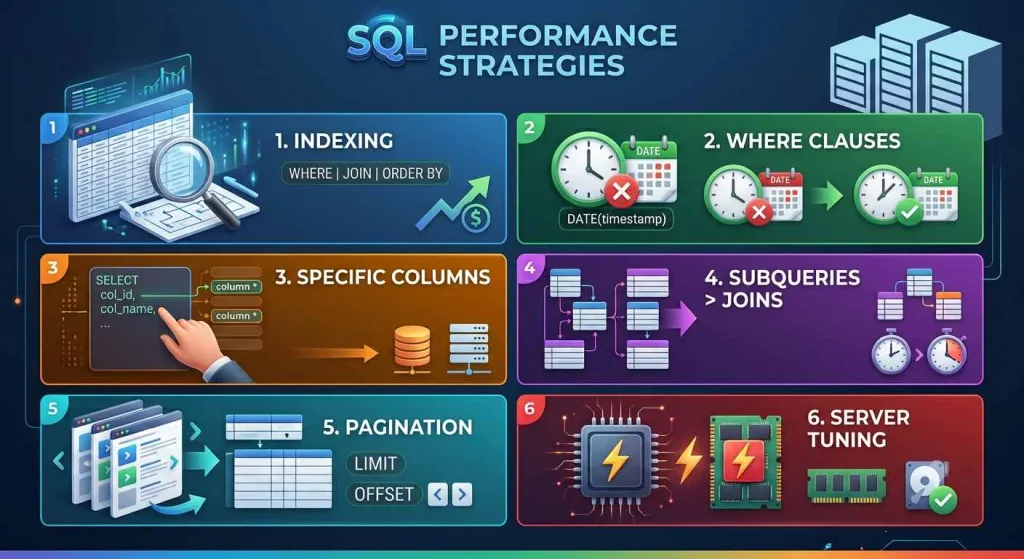
I add indexes to columns used in WHERE clauses, JOIN conditions, and ORDER BY statements, but only after EXPLAIN tells me where the pain actually is. Indexing everything “just in case” slows down writes without meaningfully helping reads.
Rewriting the WHERE Clause
I look closely at how a WHERE clause is structured. Wrapping an indexed column in a function, like applying DATE() to a timestamp column, quietly disables the index even though it looks harmless. I rewrite these so the raw column stays usable by the optimizer.
Cutting SELECT * Out of Application Code
I replace SELECT * with the specific columns an application actually needs. It’s a small change that reduces how much data MySQL has to read and send back, especially on wide tables with dozens of columns.
Turning Subqueries Into Joins
Correlated subqueries force MySQL to re-run a calculation for every row in the outer query. I rewrite these as joins whenever the logic allows it, and the difference in execution time is often dramatic.
Paginating Instead of Pulling Everything
I never let an application fetch ten thousand rows to display twenty. Pairing LIMIT with a properly indexed sort column keeps pagination fast no matter how large the table grows.
Caching What Doesn’t Change Often
For data that doesn’t shift minute to minute, I push it into an application-layer cache so MySQL isn’t hit with the same repetitive request over and over.
Tuning the Server Itself
I revisit innodb_buffer_pool_size on almost every project I inherit, because the default is rarely sized for real production traffic. Giving MySQL enough memory to keep working data cached, rather than reading from disk repeatedly, is one of the highest-impact changes I make.
When the Query Isn’t Actually the Problem
Every so often, I’ll trace a slowdown back to something outside the SQL entirely, like a locked table or a spike in concurrent connections. Running SHOW PROCESSLIST during an active slowdown tells me immediately whether other queries are blocking the one I’m chasing, which redirects my attention toward locking rather than indexing.
A Similar Principle Applies Closer to Home
The more I think about it, database performance and home maintenance follow the same logic I keep coming back to. A home that runs smoothly, whether it’s plumbing, HVAC, or electrical systems, depends on the same principle as a fast database: small inefficiencies compound if nobody catches them early. An unindexed table doesn’t fail all at once, and neither does a neglected system in a house; both degrade quietly until the cost becomes impossible to ignore.
If you’re looking at your own home with that same diagnose-first mindset, I’d point you toward opinohome.com for practical home improvement guidance, and the home upgrading resources section for a breakdown of which upgrades are worth prioritizing before small issues turn into expensive ones.
Frequently Asked Questions
How do I know if a MySQL query is actually slow?
I treat anything consistently over a second on production as worth investigating, though I adjust that threshold depending on the application. The slow query log catches these automatically, so I don’t have to rely on guesswork.
Does adding more indexes always help?
No, and I’ve made this mistake myself early in my career. Every index speeds up reads on the columns it covers but adds overhead to every write on that table. I only add indexes based on what the query patterns actually show me.
Can better hardware fix slow queries on its own?
I’ve seen this tried plenty of times, and it usually just delays the problem. A poorly indexed query on a faster server is still a poorly indexed query; it just takes a little longer before it becomes an issue again as the data keeps growing.
How often should I review slow queries?
For anything actively growing, I check the slow query log monthly so I catch regressions before customers do. For smaller, stable sites, I stretch that out, but I never skip it entirely.